Monitoring and maintenance do different jobs
Monitoring shows what a system is reporting. A support agreement defines who reviews that information, what they investigate and how they respond. A graph on your phone does not automatically mean someone is watching the system for you.
Our approach is to consider serviceability alongside the initial equipment selection. Useful fault information, authorised access and understandable handover records can make investigation more efficient. They cannot remove every need for a site visit.
Check what can actually be done remotely
An app may show production and battery charge while offering limited diagnostic detail or installer controls. Capabilities vary by inverter model, communications device, software, account permissions and the way the installation is configured.
For example, Victron documents monitoring, alarms and remote controls through an internet-connected GX device and VRM. Available controls depend on the access settings and connected equipment. This is a useful service feature, rather than a promise that every fault can be fixed online.
How we assess inverter supportability
Our support preference is Victron first, then GoodWe, then Sigenergy, followed by Deye and Sunsynk, with other equipment assessed individually. That preference reflects our support workflow. It is not a controlled reliability comparison, a ranking of every model or a guarantee of repair times.
The useful comparison is what an authorised technician can see and do on the actual proposed installation, including when something fails. Ask for that explanation before choosing equipment, rather than treating every monitoring app as equivalent.
- Victron: an online, suitably powered GX controller can provide VRM history, alarms and Remote Console access. Supported remote configuration also depends on the connected equipment, firmware and enabled access. A powered controller may remain accessible when the inverter output is off, but a battery, controller or communications failure can still remove that access.
- GoodWe: SEMS+ provides monitoring and supported remote controls. The available parameters and permissions depend on the device, account role and applicable configuration. Confirm the actual installer access rather than assuming every system exposes the same controls.
- Sigenergy: the mySigen installer manual describes device information, controls and downloadable fault-investigation logs. Some investigations require manufacturer analysis or work at the equipment; the presence of logs does not promise a remote repair.
- Deye and Sunsynk: monitoring and supported remote settings are available; they should not be described as having no diagnostics. For example, Deye documents offline-data backfill for its DL1000B loggers. Backfill requires data to have been collected: loss of logger power or inverter communications can still leave missing evidence around a fault. Check the actual logger and platform rather than generalising across models.
Ask what happens when communications stop
A missing signal can mean a router problem, a disconnected logger, a power-supply issue or an equipment fault. It is not proof that the solar system has stopped generating, and a working dashboard is not proof that every circuit is healthy.
The support team needs a process for telling these situations apart. Ask whether the communications equipment has power during an outage, what information is stored locally and what can be recovered after reconnection. Answers must be specific to the installed equipment.
Design the support path as part of the installation
Ask the designer how the router, communications link and monitoring controller stay powered when backup is needed, and what stops working if the battery itself disconnects. For a business, agree who receives a communications-loss alert and how a missing signal is investigated. A backed-up router does not help if the logger has lost its own supply.
Keep authorised access and a record of approved changes with the handover documents. Remote changes can interrupt supply or affect protection and battery operation. They belong to competent, authorised people working within the manufacturer's instructions, not to a trial-and-error response to an app notification. Never share passwords in a website enquiry.
Read the text explanation and sources
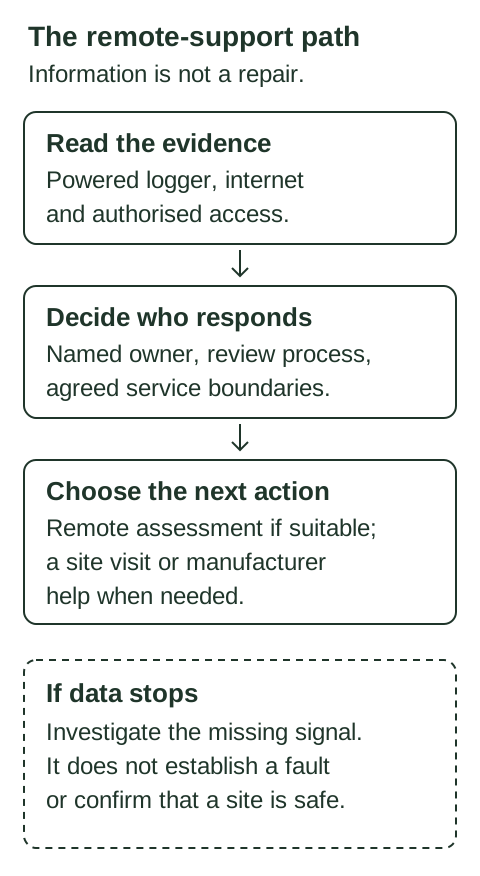
- Read the evidence using powered monitoring equipment, internet and authorised access.
- Agree a named responder, a review process and service boundaries.
- Choose suitable remote assessment, a site visit or manufacturer assistance according to the case.
- If data stops, investigate the missing signal rather than inferring equipment failure or safety.
Sources supporting this illustration
Agree responsibility before you need help
Response time should be distinguished from resolution time. An initial remote assessment, a technician attending site and a replacement part becoming available are separate events.
- Who owns the monitoring account, and who has permission to change settings?
- Does the service include active review, or only help after you report a problem?
- What are the service hours and the agreed response categories?
- Which investigations, callouts, labour and replacement parts are included?
- How are faults, actions and changes recorded?
- What happens if the internet connection is unavailable?
Make the first support conversation useful
Provide the site location, equipment models, the time the problem started and any error message. Say whether the grid and internet are available. If safe, a photograph of the displayed message can help. Do not open electrical enclosures or change protection settings to gather information.
Talk to us about maintenance, monitoring or investigation of an existing installation. We agree the scope around the equipment, available records and service coverage. Existing customers should continue using their established support contact or group.
Sources and further reading
- Victron Cerbo GX manual: VRM features, logging and access settings
- Victron VRM manual: Remote VEConfigure requirements and limitations
- GoodWe SEMS+: monitoring and remote controls
- Sigenergy mySigen installer manual: device logs and controls
- Deye DL1000B data logger: offline backfill and remote functions
- Sunsynk Connect: remote monitoring, events and supported settings